
First Alert by Resideo
Resideo Technologies, Inc.Lifestyle
4.1844.00 Reviews
- Version
- 3.0.5
- Installs
- 100.00K
- Age Rating
- Everyone
Screenshots
Our Review of First Alert by Resideo
 Analysis by Appyee
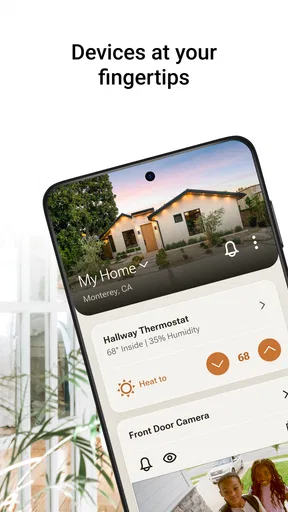
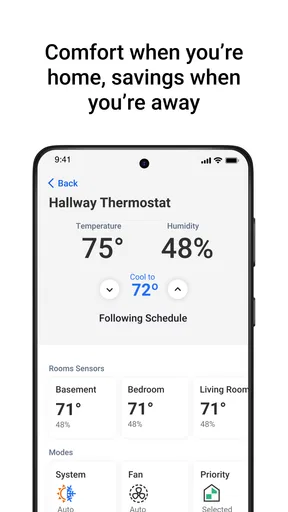
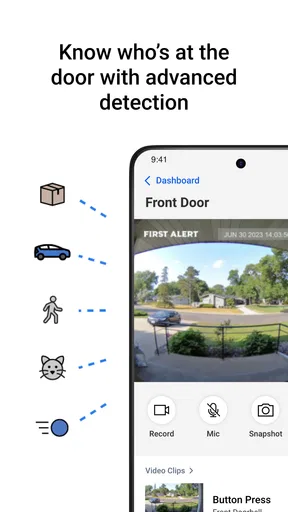
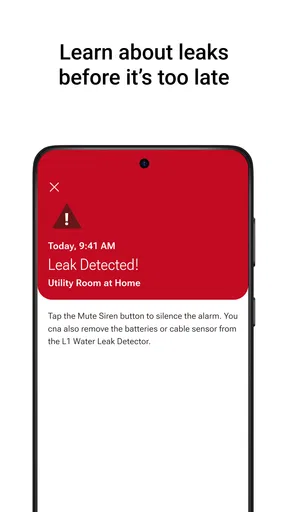
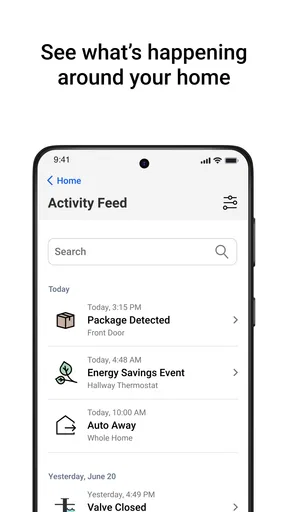
First Alert is a lifestyle app from Resideo Technologies, Inc. that brings several parts of a connected home into one place. Its focus is practical rather than flashy: comfort, safety, video, and water-leak detection are presented as parts of the same home routine. I found that approach appealing because it can reduce the need to jump between separate control screens when I want to check what is happening at home.
The app is free to download and is rated for Everyone, which makes it approachable for a household with different ages and levels of technical confidence. It does include optional in-app purchases, ranging from $4.49 to $149.99 per item, so I would treat the free installation as a starting point rather than assuming every possible service or capability is included without extra cost.
What to expect from First Alert
My first impression is that First Alert works best as a central place for people who already use, or plan to use, compatible First Alert and connected-home equipment. Rather than being a general-purpose lifestyle planner, it is built around the home itself: staying aware of safety conditions, checking video, managing comfort, and watching for signs of water trouble.
That distinction matters. If you only want a basic alarm clock, a simple camera viewer, or a standalone thermostat control, a dedicated app may feel more direct. First Alert makes more sense when you value a shared home view and want related household tasks grouped together. The benefit is less about one spectacular tool and more about having fewer places to remember.
The app has earned a 4.6 average from around 4.7 thousand ratings, and it has passed the 100 thousand install mark. Those figures suggest that it has found a real audience, but they should not replace checking whether your particular equipment is compatible. The quality of the experience depends heavily on what you connect and how your home is arranged.
On iPhone or iPad, the minimum supported operating system is version 11. The current app version is 2.26.0, and the release date shown for the app is June 18, 2024. I would still update the device before starting, especially if the first setup involves several connected products. A current operating system and a stable home network remove two common sources of unnecessary frustration.
The most useful way to think about First Alert is as a household dashboard, not as a replacement for every specialized smart-home tool. It can make everyday checking easier, but it does not automatically make a complicated setup simple. The more devices and people involved, the more important it becomes to establish a clear routine from the beginning.
Who will get the most from it
I would recommend First Alert to someone moving from one isolated smart device toward a more coordinated home setup. It is especially suitable for a person who wants to check comfort and safety-related information without opening several unrelated apps. It can also be useful for households where one person handles installation but other family members need a straightforward way to see what is happening.
It is less convincing for someone who does not own compatible equipment and has no intention of adding it. Downloading a connected-home app before deciding what devices it will manage can create more confusion than value. Likewise, if you need advanced controls for a brand ecosystem that First Alert does not cover, the manufacturer’s own dedicated platform may be the better choice.
Another important trade-off is concentration. Bringing home information together is convenient, but it also means that the app becomes a more important part of your routine. I would not rely on one screen as the only way to understand a serious safety situation. Use the app as a convenient layer for awareness and management, while keeping normal household safety habits in place.
Getting started without making setup harder
I would make the first setup session deliberately small: choose the home concern you most want to manage, then get just that part organized before adding anything else. That gives you a useful baseline for judging whether the app fits your household, rather than confusing setup hurdles with the value of the whole system. The next section looks at why even a promising first connection can still leave newcomers unsure what to do.
Begin with one clear purpose
When I install an app that can connect several kinds of home equipment, I prefer not to add everything at once. With First Alert, a calmer approach is to begin with the device or home concern that matters most to you. That might be checking a camera, organizing comfort control, or creating a way to notice a possible water issue. Starting with one goal gives you a clear test for whether the setup is working.
Before opening the app, place the relevant equipment where it will actually be used and make sure you know which room or area it belongs to. This sounds ordinary, but naming and organizing devices while you are already tired or distracted can make later checks harder. A useful label should tell you both the device type and its location, such as a hallway, utility area, or upstairs room.
I also recommend deciding who in the household needs access before you finish setup. A single person may be responsible for connecting equipment, but that person may not be the one who notices a problem first. Shared understanding is particularly important for water detection and video, where a notification only helps if someone knows what action to take.
Take the connection step by step
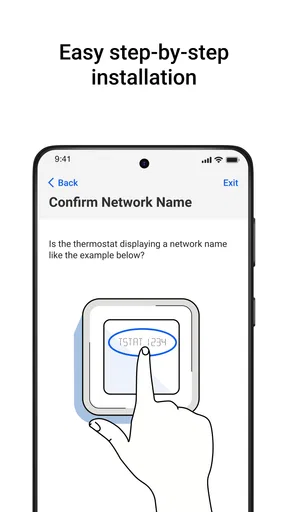
First Alert’s value depends on the relationship between the app, the connected product, and the home network. If the first connection does not work immediately, I would avoid repeatedly tapping through the same screens. Instead, pause and check the simple things: the device’s location, whether it has power, whether the phone is using the intended home network, and whether the product is close enough during the initial connection process.
Adding a single device first gives you a useful baseline. Once that device appears correctly, you can learn how First Alert presents its status before adding more. This is one of the less obvious advantages of a staged setup: if something goes wrong later, you know which addition introduced the problem instead of having to troubleshoot the entire home at once.
Do not rush past naming. A generic device name may be acceptable during installation, but it becomes inconvenient when several rooms are involved. Clear labels make everyday checks faster and reduce the chance of looking at the wrong camera or comfort setting. I consider this a small setup task with a large payoff over time.
Make the first meaningful success deliberately
The best first test is not simply seeing a device listed. I would choose one action that reflects why you installed the app. For a camera, that could mean opening the relevant view and confirming that you can identify the intended area. For comfort, it could mean checking that the correct home control is visible. For water protection, it could mean confirming that the detection equipment is associated with the right location and that everyone understands where to look for its status.
After that first successful action, close the app and return to it later. A useful home app should fit into a normal routine, not only work while you are focused on installation. Reopening it after a short break helps reveal whether the layout is understandable and whether you can find the same device without remembering every setup step.
I would also perform a simple household handoff. Ask another person to find the relevant room or device without guiding them. If they cannot tell which item to open, improve the naming or organization before adding more equipment. This test is more realistic than judging the app alone because connected-home tools are often used by someone who did not perform the original installation.
A realistic everyday scenario
Imagine leaving home for the day while a family member remains inside. Before going out, I would use First Alert to check the areas that matter most: whether the expected comfort control is visible, whether the relevant video view is available, and whether the water-related monitoring area appears normal. The point is not to stare at the app continuously. It is to create a short departure check that replaces a vague feeling of uncertainty with a repeatable routine.
Later, if a household member notices something unusual near a sink, laundry area, or other vulnerable location, the value of the app is that the issue can be considered alongside the rest of the home information. That does not eliminate the need to inspect the physical area, but it can help the household decide where to look first and who should respond.
This kind of workflow is where I see the strongest reason to choose First Alert over several disconnected alternatives. The app encourages you to think about the home as one environment. The trade-off is that the initial organization takes more care than installing a single-purpose camera or thermostat app.
Where new users may hesitate
I think the main hesitation is not necessarily a technical failure; it is deciding what the app is meant to do in a home with several kinds of connected equipment. A brief household conversation about who checks which information can make the screens feel more purposeful and prevent alerts from becoming nobody’s responsibility. From there, the focus shifts from getting connected to making the routine genuinely useful.
One app does not mean one identical experience
The first common misunderstanding is expecting every part of the app to behave the same way. Comfort controls, video, safety equipment, and water-leak detection serve different purposes, so their screens and routines may feel different. I would not judge the whole app based on the first section that seems unfamiliar. Learn each area according to the question it answers: what is comfortable, what is visible, and what may need attention.
Another confusion comes from assuming that installing the app alone creates a complete smart home. It does not. The useful experience comes from pairing the app with compatible equipment and then organizing that equipment sensibly. If you open the app before deciding what you want it to manage, the interface can feel abstract. A specific home task gives every screen a reason.
Be careful with paid options
Because the app is free but offers in-app purchases, I would read each optional purchase carefully before confirming it. The available items range from $4.49 to $149.99, which is a wide span. That does not automatically make the app poor value, but it does mean that new users should distinguish between downloading the app, connecting hardware, and choosing any additional paid service or capability.
My practical advice is to complete the basic setup first and decide what you genuinely need afterward. Do not buy an optional item simply because it appears during an exploratory tap. First determine whether the free experience already supports your main routine, then consider whether a paid addition solves a specific problem for your household.
Notifications need a household plan
Safety-related information can become useless if every person receives alerts without knowing who is responsible for responding. I would agree on a simple plan: who checks the location, who contacts another household member, and what happens when nobody is home. This is especially important when the app is used for water-leak awareness or video monitoring.
At the same time, avoid turning every possible update into an emergency in your own mind. A notification is a prompt to investigate, not a substitute for looking at the physical situation. The app can help you notice and organize information, but the most appropriate response still depends on what is happening in the home.
Privacy and convenience require a personal decision
Video and home-monitoring tools are useful precisely because they give you visibility, but that visibility is not equally comfortable for every household. Before connecting a camera, decide which rooms are appropriate and who should have access. I would keep shared spaces and household expectations in mind rather than treating convenience as the only consideration.
The same principle applies to account access. A family may prefer broad sharing for convenience, while another household may want tighter control. First Alert can be part of either approach, but the important decision should be made deliberately instead of being left to whoever happens to install the app first.
Making the second week better than the first
By the second week, I would judge the app by how quickly another person can find the right room or device, not by how often I open it. If that simple handoff is awkward, clearer names and a narrower daily check can improve the experience without adding more equipment or optional purchases. The next section turns that idea into a practical, repeatable routine.
Build a short checking routine
Once the first connection works, resist the urge to open the app constantly. I find that a small number of consistent checks is more useful than frequent, unfocused browsing. A morning check might focus on comfort and general home awareness, while a departure check could focus on the areas that matter when nobody is present. The exact routine should reflect your home rather than the app’s full feature range.
Use the app to answer questions you actually ask. If you rarely need video during the day, do not make it the center of your routine. If a particular part of the home is vulnerable to water problems, give that area a clear label and make sure the household knows where to find it. This keeps the dashboard practical instead of turning it into another source of digital clutter.
Use organization as a form of safety
A well-organized device list is not merely cosmetic. When something unexpected happens, you want to spend time responding rather than decoding names. I would review the labels after living with the app for a few days. The name that seemed obvious during setup may not be obvious to another person, or it may be too vague once more devices are added.
This is also a good time to remove mental shortcuts. Do not assume that the device at the end of a list is the one you need, or that everyone remembers which room was assigned during installation. Clear location-based organization makes First Alert more useful for guests, relatives, and anyone who may need to help when the primary user is away.
Know when another app is a better fit
I would choose a dedicated alternative when one category is all I need and I want the deepest possible controls for that category. A specialized camera app may feel quicker for someone who only wants video. A dedicated comfort platform may be preferable to someone who spends most of the day adjusting temperature settings. First Alert’s advantage appears when the household values a broader view across comfort, safety, video, and water monitoring.
I would also skip it if my equipment is outside the compatible First Alert ecosystem and I am not planning to change that. An app can be well designed and still be the wrong purchase decision when it does not match the hardware already installed. Compatibility should come before enthusiasm about having one central dashboard.
My recommendation for a first-time user
My suggested path is simple: install the free app, choose one home goal, connect one relevant device, give it a precise room name, and complete one real check. Then ask another household member to repeat that check. Only after the basic routine feels natural would I add more equipment or consider an optional purchase.
That process makes the app less intimidating and gives you a clear answer about its usefulness. You will know whether it helps with the home problem you actually care about, rather than judging it by the number of areas it can potentially bring together.
Overall, I see First Alert as a sensible lifestyle app for a connected home that combines several Resideo-related concerns in one place. Its strongest quality is the chance to turn scattered checks into a shared household routine. Its main weakness is that the experience can become dependent on careful compatibility checks, thoughtful organization, and sensible decisions about optional purchases.
For a first-time user, I would recommend starting small and treating the app as a practical layer over your home equipment. If you want one place to connect comfort, safety, video, and water-leak awareness, it is worth exploring. If you only need one specialized function or do not have compatible equipment, a more focused alternative may be easier and more economical. My final view is positive, provided you approach it as a coordinated home dashboard rather than expecting the download alone to solve every smart-home task.
First Alert is free, suitable for Everyone, and developed by Resideo Technologies, Inc. The optional in-app purchases deserve attention, but the basic starting point is approachable. For me, the app’s real success is not its first launch; it is whether I can return later, find the right room quickly, and know what to do next.
Privacy and Permissions
See what permissions an app requests and how it handles your data.
- Contacts
- read your contacts, modify your contacts
- Location
- approximate location (network-based), precise location (GPS and network-based)
- Photos/Media/Files
- read the contents of your USB storage, modify or delete the contents of your USB storage
- Storage
- read the contents of your USB storage, modify or delete the contents of your USB storage
- Camera
- take pictures and videos
- Microphone
- record audio
- Wi-Fi connection information
- view Wi-Fi connections
- Other
- view network connections, pair with Bluetooth devices, access Bluetooth settings, allow Wi-Fi Multicast reception, full network access, change your audio settings, run at startup, control vibration, prevent device from sleeping
Verdict
Strengths of First Alert by Resideo
- Quickly view compatible First Alert and Resideo device alerts.
- Useful remote notifications for smoke, carbon monoxide, and security events.
- Supports connected-home awareness while you are away.
- Clean interface makes important alerts easy to find.
- Can help centralize safety information in one mobile app.
Limitations of First Alert by Resideo
- Features depend heavily on compatible First Alert or Resideo hardware.
- Some devices may require extra setup steps or account linking.
- Notifications can be delayed by weak Wi-Fi or phone connectivity.
- Advanced features may vary by product model and region.
- Background permissions may affect battery life on some phones.
Other Releases by Resideo Technologies, Inc.
View All
Resideo - Smart Home
Lifestyle3.6
Similar Picks in This Category
View All
SmartThings
Samsung Electronics Co., Ltd.4.6

Google Home
Google LLC4.0

Pinterest4.2

Astrotalk - Talk to Astrologer
Astrology & Horoscope4.7

My Verizon
Verizon Consumer Group4.5

Samsung Wallet (Samsung Pay)
Samsung Electronics Co., Ltd.4.1
Frequently Asked Questions
What is First Alert by Resideo, and what can I use it for?
First Alert by Resideo is a companion app for compatible First Alert smart safety devices, including selected smoke alarms, carbon monoxide alarms, security products, and related connected equipment. After setup, the app can help you monitor device status, receive alerts, review notifications, and manage certain settings from a mobile device. Available features depend on the specific product, region, and connection method.
Which First Alert devices are compatible with the app?
Compatibility is not universal across every First Alert product. The app is designed for supported connected devices, while many traditional standalone alarms cannot be controlled through it. Before downloading, check your alarm or product model number against the compatibility information provided by First Alert or Resideo. You may also need a compatible Wi-Fi network, an updated phone, and the correct account for device registration.
Does First Alert by Resideo replace a physical smoke or carbon monoxide alarm?
No. The app is intended to complement compatible safety devices, not replace them. Your alarms must remain properly installed, powered, tested, and maintained according to the manufacturer’s instructions. Mobile notifications can be delayed or unavailable because of internet outages, phone settings, battery limitations, or other technical issues. Always treat the audible alarm itself as the primary warning and follow local emergency procedures.
What permissions and account information does the app require?
During installation and device setup, First Alert by Resideo may request permissions such as notifications, Bluetooth or local network access, and location access, depending on your phone and the product being connected. An account may also be required to register devices and use remote features. Review the app’s privacy policy and permission prompts carefully, and enable notifications if you want to receive safety alerts away from home.
Can I monitor my home remotely with First Alert by Resideo?
Remote monitoring may be available when you use a compatible connected First Alert device with a functioning internet connection and the app is correctly configured. You can typically view device status and receive selected alerts, but performance depends on Wi-Fi, cloud services, phone connectivity, and notification settings. The app should not be considered a guaranteed emergency communication service, so maintain working alarms and use local emergency services when necessary.
